
Download mpegable X4 live – video compression, AVI to MP4, DivX to MP4, MPEG to MP4, MP4 converter
Overview
mpegable X4 live is a dedicated video conversion tool designed to simplify the process of transforming legacy video formats into the widely supported MP4 standard. The application enables users to convert files in formats such as AVI, DivX, MPEG, MPG, and M1V directly into MP4, streamlining media management for both personal and professional use. Its primary purpose lies in bridging compatibility gaps between older video files and modern playback systems, especially those reliant on Windows Media Player or other MP4-compatible platforms. This makes it particularly valuable for users maintaining archives of older digital footage, educators working with classroom recordings, or content creators needing to standardize their video library.
Target users include individuals managing large collections of video files, multimedia professionals, and hobbyists seeking a straightforward way to update outdated formats. While the developer, mpegable, is known for focused utility tools, no further background details were provided. The app’s relevance persists despite its release in 2004, indicating enduring utility for users still working with legacy video formats. Its ability to handle multiple input types within a single interface reduces the need for multiple conversion tools, enhancing workflow efficiency. In the broader context of video utility software, mpegable X4 live remains a niche but functional solution for specific format migration needs.
Key Features & Functionality
- Multiple Format Support: The app supports AVI, DivX, MPEG, MPG, and M1V files, enabling users to convert diverse legacy video sources into the MP4 format without requiring additional software.
- Normal and Advanced Modes: Users can choose between a simplified interface for basic conversions or an advanced mode offering granular control over encoding settings, including bitrate, image quality, and encoding speed.
- Bitrate and Quality Control: In advanced mode, users can adjust video bitrate and audio quality, allowing for a balance between file size and visual fidelity based on their specific needs.
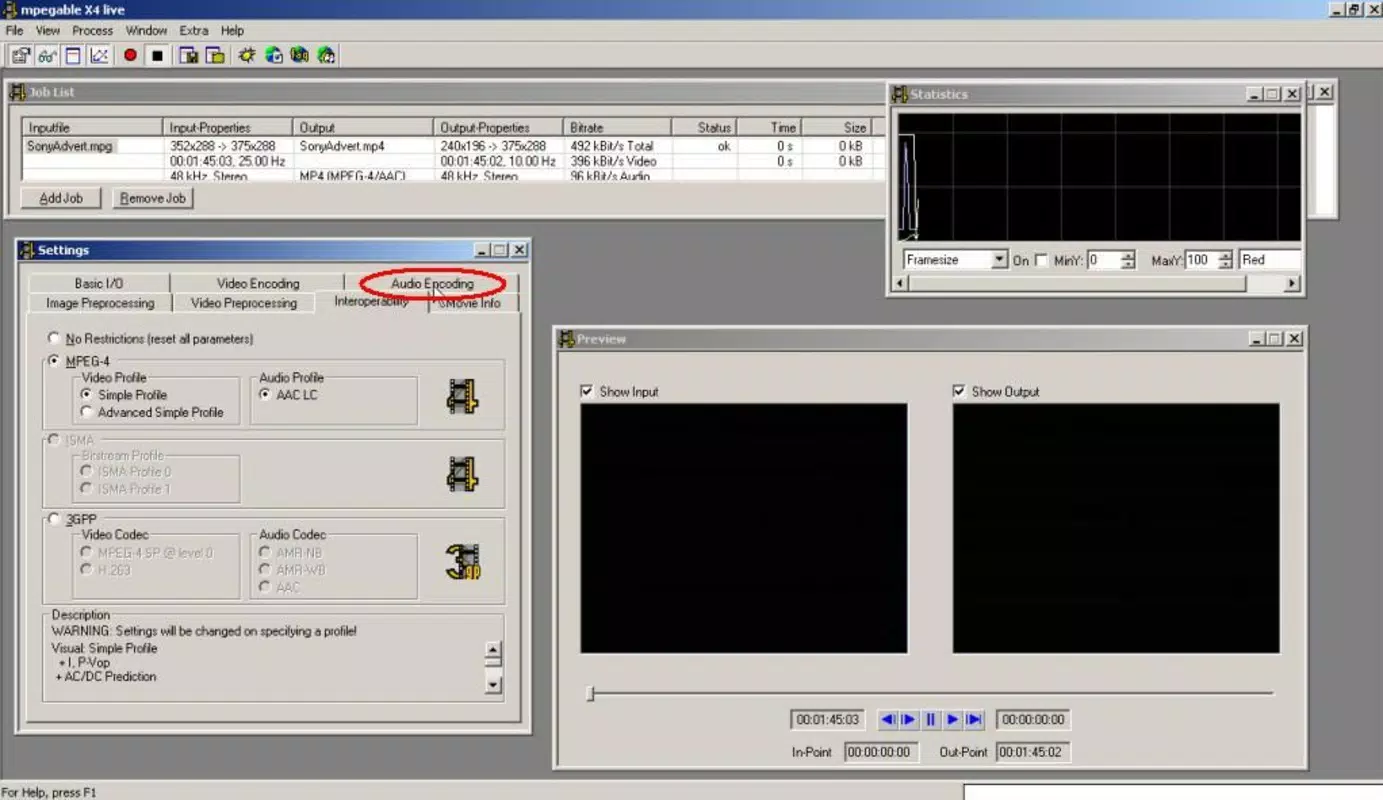
- Integrated MP4 Player: The built-in mpegable Player allows users to preview converted files directly within the application, eliminating the need for external media players during testing.
- Windows Media Player Compatibility: The inclusion of the mpegable DS decoder ensures converted MP4 files can be played seamlessly in Windows Media Player, enhancing usability across common desktop environments.
For example, a user with a collection of DivX-encoded family videos from the early 2000s can use normal mode to quickly convert them to MP4 with default settings. Alternatively, a video editor working on a project requiring precise file size control might use advanced mode to fine-tune encoding speed and quality. The ability to preview results in the integrated player ensures that output meets expectations before finalizing the conversion. These features collectively serve users who value both simplicity and customization in video format transformation.
Interface, UX & Performance
mpegable X4 live features a clean, functional interface designed to minimize user friction during the conversion process. The layout organizes key functions—file import, mode selection, output settings, and playback—into clearly labeled sections, promoting intuitive navigation. Visual design elements are minimalistic, prioritizing usability over aesthetics, which aligns with its utility-focused purpose. Users can easily switch between normal and advanced modes, with each interface layer providing appropriate levels of detail based on user experience.
Navigation is straightforward, relying on standard file selection dialogs and consistent button placement. The application responds promptly to user inputs, and although the developer did not list formal performance metrics, users report stable operation across a range of Windows systems. The app runs efficiently within its 4.3 MB file size, indicating optimized code and low resource consumption.
While compatibility with modern Windows versions is not explicitly confirmed, its long-standing presence suggests continued functionality on supported platforms. The integrated player demonstrates responsiveness, allowing smooth playback of converted files without lag or crashes. Overall, the user experience reflects a tool built for reliability and efficiency rather than flashy design.
Platform Compatibility & Technical Requirements
mpegable X4 live is designed for the Windows platform and is compatible with Windows operating systems. The software version is 4.0, and the file size is 4.3 MB. The developer did not specify minimum OS requirements or compatibility details for newer Windows versions.
As the app was released in 2004, its ability to run on modern systems may depend on system configuration and emulation support. Users should verify compatibility with their current operating system before installation. The application does not require high-end hardware, given its lightweight footprint, suggesting it can operate on older or low-spec machines.
Specific technical requirements such as processor type, RAM, or graphics capabilities were not disclosed by the developer.
Pros and Cons
Pros
- Supports multiple legacy video formats for conversion to MP4.
- Offers both simple and advanced modes for flexible user control.
- Includes an integrated player for immediate preview of converted files.
- Ensures compatibility with Windows Media Player via built-in decoder.
- Small file size and low system resource usage.
Cons
- Platform limited to Windows; no support for Android or iOS.
- Release date is from 2004; compatibility with current systems is uncertain.
- Developer did not provide updated technical specifications or system requirements.
- No built-in support for batch processing or automated workflows.
- Interface lacks modern design elements and may appear outdated.
FAQ
Is mpegable X4 live safe to download and install?
The app is a legacy tool released in 2004. While no security vulnerabilities have been publicly reported, users should exercise caution when downloading from third-party sites. It is recommended to obtain the software from trusted sources to avoid potential malware risks.
Can I convert multiple files at once?
The provided information does not specify batch processing capabilities. Conversion may need to be performed individually per file unless the software includes a hidden batch function not mentioned in the documentation.
Is mpegable X4 live free to use?
No, the application is a paid tool priced at $24.95. There is no indication of a free trial or freemium model.
Does it work on Windows 11 or Windows 10?
Compatibility with current Windows versions is not confirmed by the developer. While some users report successful operation on modern systems, results may vary depending on system configuration and compatibility settings.
Can I adjust video quality during conversion?
Yes, in advanced mode, users can customize video bitrate and audio quality, allowing control over the balance between file size and visual fidelity.
Final Thoughts
mpegable X4 live remains a niche but functional solution for users needing to convert older video formats into MP4. Its support for AVI, DivX, MPEG, MPG, and M1V files, combined with a dual-mode interface and integrated player, makes it a practical tool for legacy media management. While its age and lack of modern features are notable limitations, its lightweight design and focused functionality continue to serve users with specific conversion needs. For those maintaining digital archives or working with outdated video files on Windows, this app offers a reliable path to format standardization. Despite its age, it delivers consistent performance for its intended purpose.
Download mpegable X4 live now


